

Why Dynamic Tone MappingIs Critical for Projectors
HDR on a projector is not just about accepting an HDR signal. That is the easy part. The difficult part is what the projector does after it receives that signal.
And this is where many projectors fail.
HDR content is usually mastered for displays that can reach hundreds or even thousands of nits. A projector, even a very bright one, lives in a completely different world. It has limited peak brightness, limited black level, limited contrast, and it spreads its light over a very large screen. So when we send a proper HDR signal to a projector, the projector has to make a very important decision:
How do I fit all this brightness information into the much smaller light range I can actually produce?
That decision is called tone mapping.
And when the projector can make this decision scene by scene, or even frame by frame, we call it dynamic tone mapping.
PQ and EOTF, the foundation of HDR
Most consumer HDR formats are based on PQ, which stands for Perceptual Quantizer. PQ is defined in SMPTE ST 2084 and is also part of ITU-R BT.2100, the official ITU recommendation for HDR television systems. BT.2100 defines HDR systems based on PQ and HLG transfer functions.
In simple words, PQ is the curve that tells the display how bright each digital video level should be. This curve is called the EOTF, or Electro-Optical Transfer Function.
SDR uses a relative gamma system. HDR PQ is different. PQ is an absolute system. A certain signal level corresponds to a specific light output in nits. That is a very important difference.
This is perfect for mastering monitors, because the content creator can define brightness with precision. But it creates a huge problem for projectors.
Why?
Because the PQ system can describe brightness up to 10,000 nits, while a home theater projector may deliver only a small fraction of that brightness on screen. Apple’s Final Cut Pro documentation also describes PQ as a transfer function that relates image signal values to absolute light levels and notes that it is used in HDR10, HDR10+ and Dolby Vision.
So the projector must compress the HDR signal. It must decide what to keep, what to reduce, and what to sacrifice.
This is the heart of HDR projection.
Why static HDR is not enough for projectors
The most basic HDR format is HDR10.
HDR10 is open, widely supported, and extremely important. A display can be called HDR compatible if it can receive and process HDR signaling, static HDR metadata, and the HDR10 Media Profile.
But HDR10 has one major limitation: it uses static metadata.
Static metadata means that the movie sends one general brightness description for the entire film. It may include values like the maximum light level of the brightest pixel and the average light level of the brightest frame. The HDR10+ official ecosystem paper explains that static metadata is one unchanging set of data used for the entire program.
That works better on TVs than on projectors. A bright TV has more room to play with. A projector does not.
Imagine a movie with one very bright explosion at 4,000 nits, but most of the film is dark and atmospheric. With static metadata, the projector may build its tone mapping curve around that one extreme highlight. The result can be a darker overall picture, crushed shadow detail, or a flat image that never really opens up.
This is why HDR10 playback on projectors can look very different from one model to another. The format is the same, but the projector’s internal tone mapping is doing most of the real work.
What dynamic tone mapping actually does
Dynamic tone mapping is the projector’s real-time HDR decision engine.
Instead of using one curve for the entire movie, the projector analyzes the image and adjusts the PQ curve according to the brightness needs of each scene, or sometimes each frame.
- A dark scene needs one approach.
- A bright outdoor scene needs another.
- A mixed scene, with deep shadows and bright highlights in the same frame, needs something even more careful.
Good dynamic tone mapping tries to protect three things at the same time:
shadow detail, so dark scenes do not become a black mess.
midtone brightness, so faces and normal objects look natural.
highlight detail, so bright clouds, lamps, fire, reflections and sunlight do not turn into white blobs.
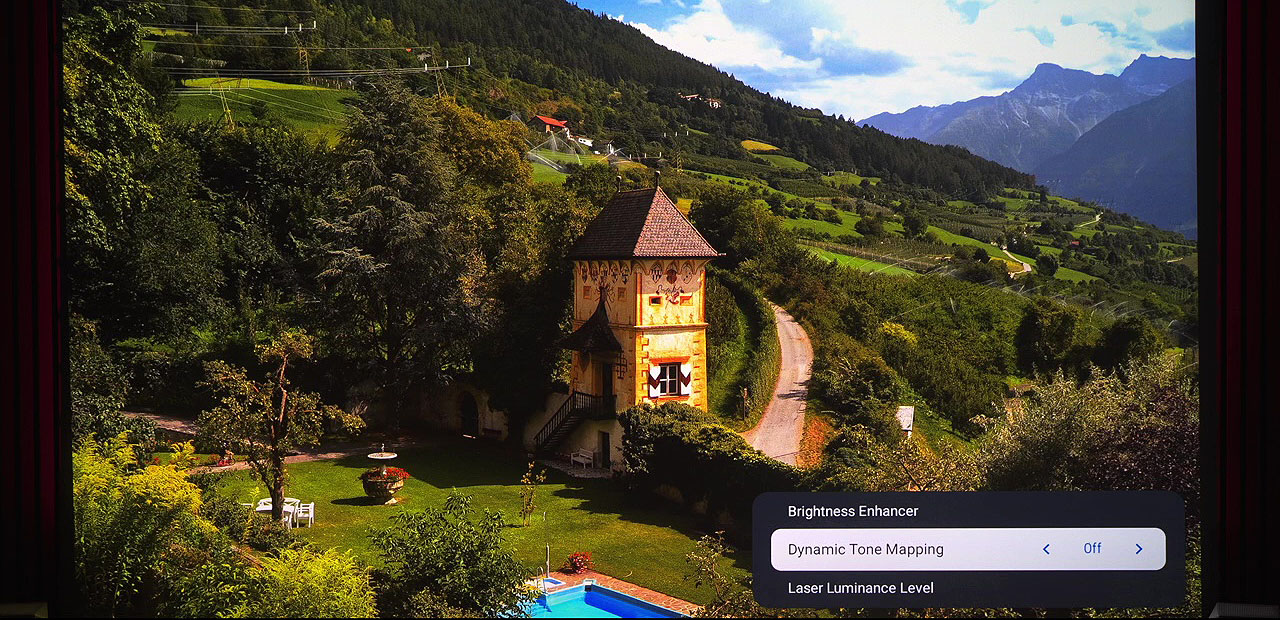
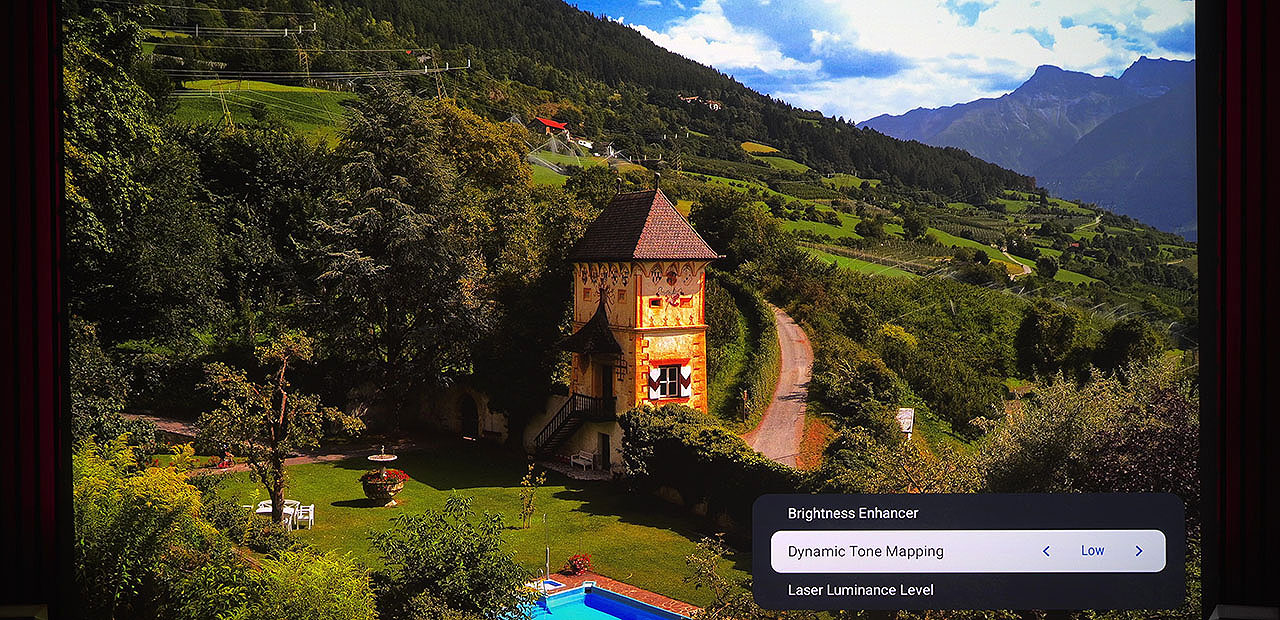
This is why dynamic tone mapping is not just “another” feature. On a projector, it can be the difference between HDR that simply look worst than SDR and HDR that actually looks like HDR.
In my Horizon 20 Max review, I already described dynamic tone mapping as the projector adjusting the PQ curve in real time and compressing the 10,000-nit HDR range into the brightness range the projector can actually produce.
And that is exactly the point. HDR on a projector is not about reproducing 4,000 or 10,000 nits. That is impossible. It is about making the best possible translation.
The three main HDR formats
HDR10
HDR10 is the baseline HDR format. It uses PQ, 10-bit video, wide color, and static metadata. It is the most universal HDR format and almost every HDR display supports it.
For projectors, HDR10 depends heavily on the projector’s own tone mapping. The format gives the projector some general information, but after that, the projector has to make many decisions by itself.
A projector with poor HDR10 tone mapping may look too dark, too flat, or too clipped. A projector with good tone mapping can make HDR10 look excellent, even without dynamic metadata.
HDR10+
HDR10+ was created to improve the basic HDR10 system by adding dynamic metadata.
The official HDR10+ material explains that dynamic metadata allows the display to optimize tone mapping on a scene-by-scene basis, instead of using one static curve for the whole program.
This is very important for projectors because the projector receives better instructions for each part of the movie. A dark scene can be mapped differently from a bright scene. The result can be better brightness balance, better highlight control, and a picture closer to the creative intent.
HDR10+ is also designed to remain compatible with the HDR10 ecosystem, which is one of its practical advantages.
Dolby Vision
Dolby Vision is the most advanced and controlled consumer HDR format. It also uses PQ, but it adds Dolby’s own metadata system and display mapping logic.
Dolby’s professional documentation explains that Dolby Vision can create shot-by-shot or frame-by-frame metadata and use real-time tone-mapped playback for specific target displays.
Dolby also describes its metadata as including global, shot-based and frame-based structures.
For projectors, Dolby Vision can be extremely useful, but only when implemented properly. The projector still has limited brightness. Dolby Vision does not magically create more light. What it can do is give the projector better instructions on how to map the content inside its real capabilities.
This is why two Dolby Vision projectors can still look different. The format is powerful, but the final image depends on the projector’s brightness, contrast, black level, color volume, processing, and Dolby Vision implementation.
Why projectors need DTM more than TVs
A high-end TV may reach 1,000, 2,000, or even more nits in highlights. A projector cannot do that on a normal home cinema screen.
Even if a projector is rated at 3,000 or 4,000 lumens, that does not mean it produces TV-like HDR brightness. Screen size, screen gain, calibration mode, laser power, lens position, ambient light and black floor all matter.
This is why projectors are the hardest displays for HDR.
They must take content mastered for very bright displays and rebuild it for a large reflective screen with much lower peak luminance. That requires smart processing, careful EOTF tracking, and good dynamic decisions.
Bad tone mapping makes HDR look worse than SDR.
Good tone mapping makes HDR look more dimensional, more cinematic, and more natural.
Excellent dynamic tone mapping can make a projector feel as if it has more contrast and more brightness than the numbers suggest.
The most important part: EOTF tracking
When I test HDR on a projector, I do not only look at peak brightness. Peak brightness alone tells only a small part of the story.
The real question is how the projector follows the PQ EOTF.
- If the projector tracks the EOTF too low, the image looks dark and lifeless.
- If it tracks too high, the picture may look bright at first, but it can lose depth, wash out faces, and clip highlights.
- If it compresses too aggressively, the image may look punchy but unnatural.
- If it is too conservative, HDR loses its impact.
This is where dynamic tone mapping becomes an art.
The best projectors do not simply brighten the image. They balance the whole picture. They protect the dark parts, lift the midtones when needed, and compress highlights without destroying them.
Final thoughts
HDR is not a simple checkbox on a projector spec sheet.
HDR10, HDR10+ and Dolby Vision are important formats, but the format alone does not guarantee a great image. Especially with projectors, the real performance comes from the way the projector handles PQ, EOTF and tone mapping.
This is why dynamic tone mapping is one of the most important features in modern projectors.
A projector can have high brightness, wide color and good contrast, but if its tone mapping is weak, HDR will never look right.
When dynamic tone mapping is done properly, HDR gains depth, highlights become more controlled, dark scenes keep their detail, and the whole image feels more natural.
For me, this is one of the biggest differences between a projector that only supports HDR and a projector that can actually display HDR.
Official references
ITU-R BT.2100, HDR-TV image parameters and PQ/HLG transfer functions:
https://www.itu.int/dms_pubrec/itu-r/rec/bt/R-REC-BT.2100-3-202502-I!!PDF-E.pdf
CTA HDR Compatible Display definition and HDR10 Media Profile:
https://cdn.cta.tech/cta/media/media/membership/pdfs/video-technology-consumer-definitions.pdf
HDR10+ official ecosystem information:
https://hdr10plus.org/wp-content/uploads/2025/04/HDR10_Ecosystem_April_2025.pdf
Dolby Vision professional creator documentation and metadata information:
https://professional.dolby.com/content-creation/dolby-vision-for-content-creators/